


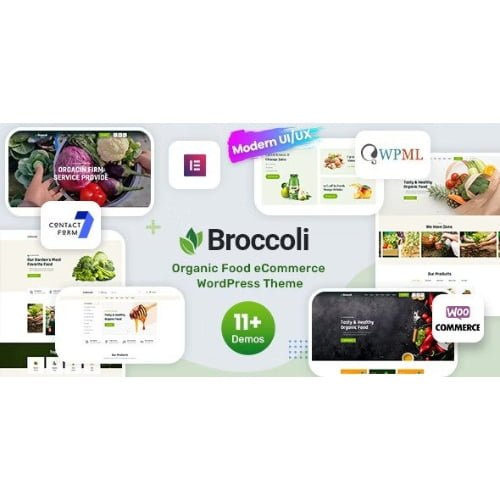
Broccoli GPL – Organic Shop WooCommerce Theme for Stores
The organic shop woocommerce theme Broccoli is a WordPress and WooCommerce design for businesses selling organic products. It helps you build an online grocery shop with a product catalogue and shopping cart, giving organic food stores a dedicated starting point for their ecommerce website. Use the Broccoli WooCommerce theme to showcase your range in one place.
- 100% genuine GPL-licensed original files
- Lifetime updates included with your purchase
- Instant download after checkout
- Scanned, clean and safe for use on unlimited websites

Subscribe Today
Get Monthly Plan with unlimited downloads @ 75% Off
Rs. 499 Only
$59.00 Original price was: $59.00.$2.39Current price is: $2.39.
Payment Methods:

Description
Broccoli is an organic shop woocommerce theme for building a WordPress storefront around organic products, fresh groceries and everyday essentials. With WooCommerce providing the shopping features, it gives store owners a dedicated starting point for presenting a product catalogue and helping customers browse and shop online.
Use the Broccoli WooCommerce theme to shape an online grocery shop around your range and your business. Add your products, organise the catalogue and configure the store to suit the way you sell, whether you are starting a new organic food store or refreshing an existing ecommerce website.
Key Benefits
- A store-focused foundation: Broccoli is designed for an organic shop, giving you a relevant starting point instead of building your ecommerce website around an unrelated design.
- Product catalogue support: Present organic products in a WooCommerce catalogue so visitors can browse the range and find items they want to purchase.
- Shopping through WooCommerce: Use WooCommerce store functionality, including a shopping cart, to give customers a clear route from product discovery to checkout.
- Room to shape your brand: Configure the storefront with your business details, product selection and content to create an online presence that reflects your store.
The theme brings the storefront and product catalogue together in one place. This can make it easier for customers to explore what you sell, while giving you a WordPress-based setup to manage and develop over time.
Who Is It For?
Broccoli is a practical choice for organic food retailers, local grocery businesses, independent sellers and entrepreneurs setting up an online store. Freelancers and agency owners can also use this organic store WordPress theme as a starting point when building a WooCommerce shop for a client in the food or grocery sector. It is suited to store builders who want a relevant foundation and plan to add their own products and business content.
What You Get
- Broccoli theme files for use with a WordPress website.
- A theme designed to work with WooCommerce for online selling.
- A storefront foundation for presenting an organic products catalogue.
- Product download files associated with item DX40722.
The package is focused on the theme itself. Your product listings, store information and other website content can be added as you set up the site. Any available setup notes or supporting files are provided with the download when included in the package.
Easy Installation
- Sign in to your WordPress dashboard and open the area for adding a theme.
- Upload the Broccoli theme files from your download and install the theme.
- Activate Broccoli, then configure the site details and WooCommerce settings for your store.
- Add your products and organise the catalogue before making the shop available to customers.
Take the setup one step at a time: first activate the design, then prepare the store and add your product information. The result is a storefront that is ready to reflect your business and its range.
Compatibility
Broccoli is a WordPress theme intended for use with the latest WordPress. It is designed for WooCommerce, so you can build an online shop using WooCommerce’s ecommerce features. For the smoothest setup, install and configure WooCommerce on your WordPress website, then add your products and store details.
Why SafeGPL
SafeGPL provides fast delivery so you can get started with your download promptly. The latest version is available, helping you begin with an up-to-date copy of the product. Files are clean and ready to use, making it straightforward to add the theme to your WordPress setup. Helpful support is available to assist with download and setup questions.
FAQ
What is the Broccoli theme used for?
It is a WooCommerce theme for creating an online shop focused on organic food, groceries and related products. You can use it as the storefront foundation for your own catalogue.
How do I use the Broccoli organic shop theme?
Install and activate the theme through WordPress, set up WooCommerce, then add your products and store information. You can configure the site to suit your business and the way you want to present your range.
Do I need WooCommerce to sell products?
WooCommerce is the ecommerce plugin the theme is designed to work with. Set it up on your WordPress site to manage online product sales and shopping cart functionality.
Where can I get the DX40722 WooCommerce theme?
You can get the Broccoli theme download from SafeGPL. The product is listed as DX40722, which can help you identify the correct item.
Is this suitable for a new organic food store?
Yes. Broccoli offers a dedicated starting point for a new store, with a WordPress and WooCommerce setup for presenting products online. Add your own catalogue and business content as you build the shop.
For retailers who want a focused foundation for selling organic products online, this organic shop woocommerce theme brings a store-oriented design together with WooCommerce functionality. Start with Broccoli, then shape the catalogue and storefront around your business.