

AccessPress Social PRO plugin GPL – Social Sharing Plugin
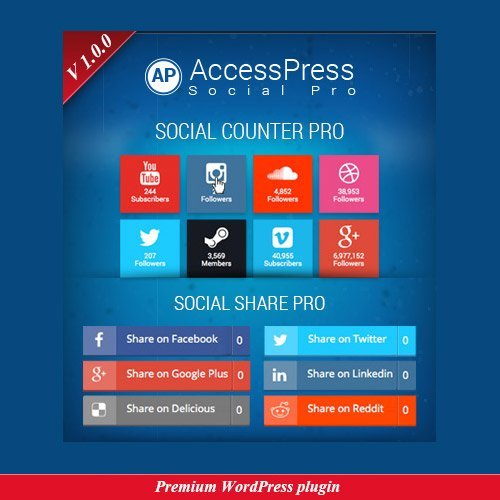
AccessPress Social PRO plugin is a WordPress social sharing plugin that helps website owners add social media share buttons to their pages and posts. It offers options such as a floating share bar, share counters, and responsive buttons, so visitors can share content across social platforms. Suitable for bloggers, businesses, and other WordPress site owners.
- 100% genuine GPL-licensed original files
- Lifetime updates included with your purchase
- Instant download after checkout
- Scanned, clean and safe for use on unlimited websites

Subscribe Today
Get Monthly Plan with unlimited downloads @ 75% Off
Rs. 499 Only
₹59 Original price was: ₹59.₹2Current price is: ₹2.
Payment Methods:

Description
The AccessPress Social PRO plugin adds social sharing tools to a WordPress website, helping visitors share useful pages and posts with their networks. With options such as responsive share buttons, a floating share bar and share counters, it gives site owners practical ways to make content easier to pass along.
Choose button placements and presentation to suit your site, then give readers a clear path to sharing articles, business updates and other content. The result is a more connected experience for visitors and a useful addition to your WordPress publishing toolkit.
Key Benefits of the AccessPress Social PRO plugin
- Make sharing easy: Add social media share buttons to pages and posts so readers can share content without leaving the page to find a separate sharing tool.
- Keep buttons within reach: A floating share bar can keep sharing options visible as visitors browse, making them convenient to access across longer content.
- Show social proof: A social share counter can display sharing activity alongside content, giving visitors a quick indication that others have shared it.
- Support different screens: Responsive share buttons adapt to a range of screen sizes, helping provide a more comfortable experience for visitors on phones, tablets and desktops.
These options help you present sharing tools in a way that fits your content and audience. Use social media icons to make the available networks easy to recognise, and choose placements that complement the way readers move through your site.
Who Is It For?
This WordPress social sharing plugin is suited to bloggers, small businesses, publishers, freelancers and agencies managing WordPress sites. It can help store builders and other site owners make posts and pages easier to share, while giving developers and content teams a straightforward set of sharing options to configure for different projects.
What You Get
- AccessPress Social PRO plugin files for adding social sharing tools to a WordPress site.
- Options for social media share buttons, including responsive button presentation.
- Floating share bar and social share counter features.
- Configuration options for setting up the sharing experience on pages and posts.
The available tools can be configured to suit your site’s content and layout. Check the plugin settings after activation to explore the options provided for your installation.
Easy Installation
- In your WordPress dashboard, open the plugins area and choose the option to add a plugin. Upload the AccessPress Social PRO plugin files.
- After installation, activate the plugin from the dashboard.
- Open the plugin settings, choose the sharing options and placements that suit your site, and save your configuration.
Once configured, review a page or post on your site to see how the share buttons appear to visitors. You can adjust the settings as needed to fit your content presentation.
Compatibility
AccessPress Social PRO is a plugin for WordPress and is intended for use on WordPress websites. Check the plugin details and your site setup when planning how to use it alongside other tools. WooCommerce-specific compatibility is not established here, so confirm your intended store setup before relying on store-specific behaviour.
Why SafeGPL
SafeGPL makes your purchase straightforward with fast delivery, so you can get started promptly. The latest version available is provided, with clean files ready to use in your WordPress setup. If you need help along the way, helpful support is available to assist with your purchase and getting started.
FAQ
What does AccessPress Social PRO do?
It adds social sharing options to WordPress pages and posts, including share buttons, a floating share bar and share counters.
How do I use AccessPress Social PRO?
Install and activate it through your WordPress dashboard, then configure the available sharing options and placements in the plugin settings.
Can I add a floating share bar?
Yes. The plugin includes a floating share bar option, giving visitors an accessible way to share content as they browse.
What is included in the AccessPress Social PRO download?
The download includes the plugin files and the sharing features described above. After installation, use the plugin settings to explore its available configuration options.
Where can I find AccessPress Social PRO pricing and purchase details?
Visit the product listing on SafeGPL for current purchase information. The latest version available is supplied, along with fast delivery and helpful support.