

WooCommerce AI Chatbot GPL – ChatGPT Retargeting Plugin
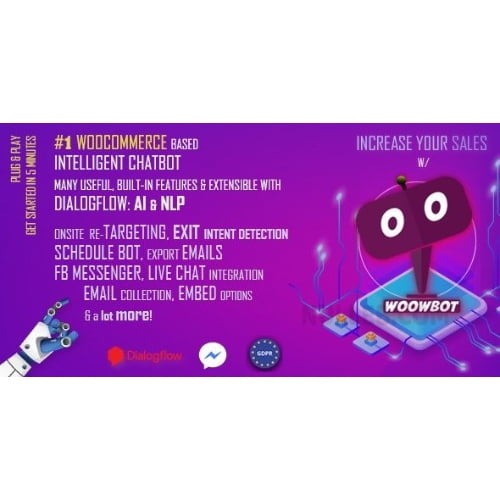
This WooCommerce AI chatbot helps store owners support shoppers and guide them towards relevant products using ChatGPT integration. It can engage visitors with automated customer support, AI product recommendations and an exit intent popup for visitor retargeting. Designed for WooCommerce businesses, it brings timely assistance to shopping journeys and encourages shoppers to complete their purchase.
- 100% genuine GPL-licensed original files
- Lifetime updates included with your purchase
- Instant download after checkout
- Scanned, clean and safe for use on unlimited websites

Subscribe Today
Get Monthly Plan with unlimited downloads @ 75% Off
Rs. 499 Only
$59.00 Original price was: $59.00.$2.39Current price is: $2.39.
Payment Methods:

Description
The WooCommerce AI chatbot helps your store answer shopper questions, suggest relevant products and engage visitors as they browse. With ChatGPT integration, retargeting features and an exit intent popup, it can support more helpful shopping journeys and encourage customers to continue towards checkout. It gives visitors another way to interact with your shop when they need guidance, while helping you create opportunities to bring attention back to products they have viewed.
Key Benefits
- Offer timely customer support: Give visitors an interactive way to ask questions while they shop. Automated customer support can help address common queries and keep the buying journey moving. A chatbot can be especially useful when shoppers want a quick response as they compare items or browse your catalogue.
- Guide shoppers to relevant products: AI product recommendations can help visitors discover items that suit their interests, making it easier to explore your catalogue and choose what to buy. Product discovery can be helpful for stores with a range of items, giving shoppers a conversational route to products they may want to consider.
- Reconnect with visitors: Retargeting features give you a way to engage shoppers who may be leaving your store. A timely message can invite them to take another look at products or continue their visit. Use this opportunity to draw attention to relevant items without interrupting the overall shopping experience.
- Make exit moments more useful: An exit intent popup can appear as a visitor is about to leave, giving you an opportunity to share a prompt or offer a next step. This can support abandoned cart recovery and WooCommerce store conversion efforts. It also provides a way to encourage visitors to keep exploring rather than ending their session immediately.
Together, these features can make your store easier to navigate and give visitors more ways to get help. You can use conversational assistance for questions, recommendations to support product discovery, and engagement prompts when shoppers appear ready to leave. The value depends on how you configure the plugin and the needs of your audience.
Who Is It For?
This plugin is suited to WooCommerce store owners, freelancers, agency owners and website builders who want to add conversational assistance to an online shop. It can be useful for stores with varied product ranges, teams looking to provide more responsive support, and businesses interested in engaging visitors before they leave. If you want a ChatGPT chatbot for WooCommerce that combines shopper assistance with retargeting options, this tool brings those capabilities into your store experience.
It may also suit businesses that want to give customers a self-service way to explore products while keeping a clear route to human assistance or the rest of the store. Consider the questions shoppers commonly ask and the products they often compare when deciding how to configure the chatbot. This can help you make its role in the customer journey more useful and relevant.
What You Get
- The AI ChatBot for WooCommerce plugin files for installation on a WordPress website.
- ChatGPT integration features for shopper conversations.
- Chatbot functionality for automated customer support and AI product recommendations.
- Retargeting and exit intent popup features for engaging store visitors.
Easy Installation
- Sign in to your WordPress dashboard and open the plugins area.
- Upload the downloaded plugin package and choose the option to install it.
- Activate the plugin, then review its available settings and configure the chatbot and engagement features for your store.
Once configured, you can tailor how the chatbot fits into your shopping experience. Check the plugin’s available settings to connect and adjust the features you plan to use. Before making the chatbot available to customers, review how its prompts and recommendations appear on your site. This gives you a chance to check that the interaction suits your store and provides a sensible next step for visitors.
Compatibility
This product is a WooCommerce plugin for use with a WordPress website that runs WooCommerce. For the best experience, use the latest WordPress and WooCommerce versions available to your store, and review your site setup before installation. The chatbot’s available features and settings may depend on how you configure the plugin and your store.
Why SafeGPL?
SafeGPL makes digital products easy to access, with fast delivery after your order. You can get the latest version available, with clean, ready-to-use files for a straightforward start. If you need a hand, helpful support is available to assist with your purchase and getting started.
FAQ
What does this WooCommerce chatbot do?
It adds conversational support to a WooCommerce store, with ChatGPT integration, product recommendations, retargeting and exit intent popup features.
Can the chatbot help shoppers find products?
Yes. Its AI product recommendations can guide visitors towards relevant items as they browse your store.
How does the exit intent feature work?
The WooCommerce exit intent chatbot can present a popup as a visitor is preparing to leave, creating a timely opportunity to invite further engagement.
How do I add ChatGPT chatbot to WooCommerce?
Install and activate the plugin from your WordPress dashboard, then configure its available chatbot settings for your store. Review the plugin settings for any connection details needed to use ChatGPT features.
Can I use it for abandoned cart recovery?
Retargeting and exit intent features can help you re-engage visitors who may be leaving before completing a purchase. The outcome depends on your store setup and how you configure the messages.
Bring conversational support and timely visitor engagement together with a WooCommerce AI chatbot designed to help shoppers find products, get assistance and continue their purchase journey. Configure the available features around the way your customers browse, and give them another helpful touchpoint within your WooCommerce store.