


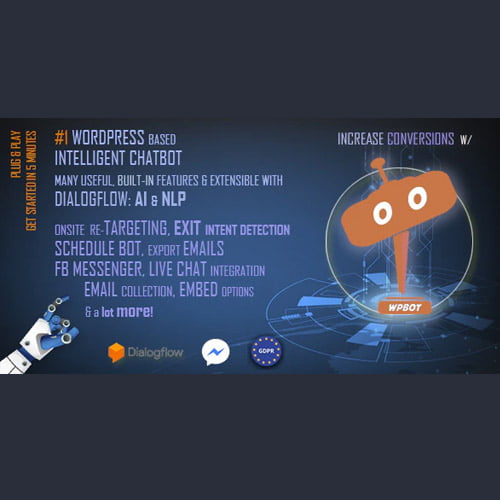
ChatBot for WordPress GPL – WordPress chatbot plugin
ChatBot for WordPress is a WordPress chatbot plugin that adds a conversational chat interface to your website. It helps businesses engage visitors and handle common customer enquiries through automated customer support. Designed for WordPress site owners, it offers a straightforward way to make help available while visitors browse.
- 100% genuine GPL-licensed original files
- Lifetime updates included with your purchase
- Instant download after checkout
- Scanned, clean and safe for use on unlimited websites

Subscribe Today
Get Monthly Plan with unlimited downloads @ 75% Off
Rs. 499 Only
$59.00 Original price was: $59.00.$2.39Current price is: $2.39.
Payment Methods:

Description
ChatBot for WordPress is a WordPress chatbot plugin that adds a conversational chat interface to your website. It gives visitors a direct way to engage with your business and helps you handle common customer enquiries through automated customer support.
By making help available while people browse, this ChatBot for WordPress plugin can support a more responsive website experience. It is designed for WordPress site owners who want to bring visitor conversations into their online presence. A chat option can sit alongside the pages where you explain your services, share useful information or invite visitors to get in touch.
Key Benefits of This WordPress Chatbot Plugin
- Give visitors a clear way to engage. A website chat widget makes a conversational contact option available as people explore your pages, helping them take the next step when they have a question.
- Support common enquiries. Use chatbot functionality to assist with routine customer questions, making automated customer support part of your website experience.
- Encourage visitor engagement. A chat interface for websites offers visitors another way to interact with your business, alongside the information and services already presented on your site.
- Bring chat to your WordPress site. The plugin is made for WordPress, giving site owners a way to add chatbot functionality within their existing website setup.
Adding a conversational option can be useful when visitors want to ask a question while they are already reading about your business. It gives them an alternative to searching through multiple pages for a contact route. The plugin is intended to support that interaction, while your existing website content continues to provide details about what you offer.
Who Is It For?
This plugin is suited to freelancers, small business owners, agencies and WordPress site builders who want to make customer conversations part of a website. It can be a useful choice for service providers and businesses that receive customer enquiries online and want visitors to have a conversational way to seek assistance. If you manage a WordPress website and want to explore a chatbot integration, this plugin offers a purpose-built starting point.
It may also suit teams reviewing ways to make their website easier to use for people who have questions before contacting the business. Consider the kinds of enquiries your visitors commonly make and whether a chat experience fits the way you currently provide information and support. The available configuration options can be reviewed after activation.
What You Get
- The ChatBot for WordPress plugin download package.
- Plugin files for adding the chatbot to a WordPress website.
- The files required to install and activate the plugin.
The download is focused on the plugin itself. Chatbot configuration and the options available after installation can be reviewed from your WordPress site once the plugin is active. The product information does not specify additional services or integrations, so check the plugin’s settings and product details to understand what is available for your intended setup.
Easy Installation
- Sign in to your WordPress admin dashboard and open the area for adding plugins.
- Upload the downloaded plugin package, then choose the option to install it.
- Activate ChatBot for WordPress and review its available settings to configure it for your website.
These steps provide a straightforward route from download to activation. Once installed, you can use the plugin’s available configuration options to set up its chatbot experience for your site. Review the result on your website after setup to check that the chat option appears as expected and suits the way visitors use your pages.
Compatibility
ChatBot for WordPress is designed for WordPress websites and is installed as a WordPress plugin. Use the latest WordPress release for your site and check the plugin’s available settings after activation. WooCommerce compatibility is not specified in the available product information, so review the setup options for your intended store use.
Why SafeGPL
SafeGPL offers fast delivery so you can access your download promptly. We provide the latest version available, with clean, ready-to-use files prepared for installation. If you need help with your download or getting started, our helpful support team is here to assist. Choose SafeGPL for a straightforward way to access your WordPress chatbot plugin.
FAQ
What does ChatBot for WordPress do?
It adds a conversational chat interface to a WordPress website and helps businesses engage visitors and handle common customer enquiries through automated support.
How do I add ChatBot to WordPress?
Install the downloaded plugin package from your WordPress admin dashboard, activate it, then review the available settings to configure the chatbot for your site.
Can I use it as a customer support chatbot?
Yes. The plugin is intended to help with visitor engagement and common customer enquiries through a chatbot experience on your website.
Is this a chat widget for my website?
It adds chatbot functionality to your WordPress site. The chat experience and its available options can be reviewed after installation and activation.
What should I know about the ChatBot for WordPress plugin price?
Check the product page for current pricing and download details. SafeGPL provides the latest version available with fast delivery and helpful support.
A Practical Chatbot Addition for WordPress
Give visitors another way to connect with your business using ChatBot for WordPress. With a conversational interface and support for common enquiries, this WordPress chatbot plugin can help make your website more responsive to visitor needs.
Before installing, consider where a chat option would be most useful to your audience and what kinds of questions you want to address. After activation, review the available settings and see how the chatbot experience fits with your website’s existing content and contact paths.