


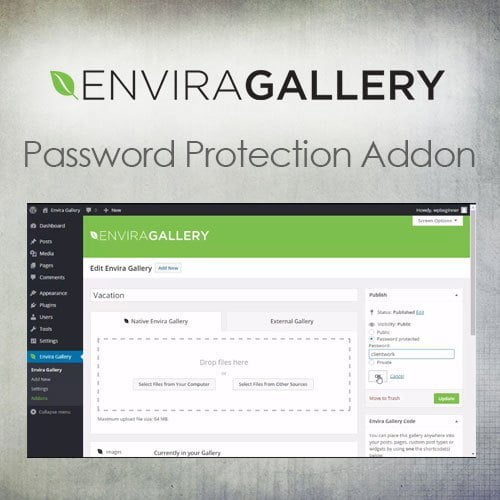
Envira Gallery – Password Protection Addon
- Original GPL Product from the developer
- 100% Clean Files & Free From Virus
- Unlimited Domain Usage
- Free New Version
- Regular Updates
- Use it for Personal or Client Projects
- Get this product for free in membership
- License : GPL

Subscribe Today
Get Monthly Plan with unlimited downloads @ 75% Off
Rs. 499 Only
$15.59 Original price was: $15.59.$2.39Current price is: $2.39.
Payment Methods:

Description
Envira Gallery – Password Protection Addon: The Essential Vault for Your Visual Content
As a Senior WordPress Developer and SEO Content Specialist with over a decade of experience, I’ve worked extensively with high-value digital assets—from client photography portfolios to proprietary business documents, all housed within WordPress galleries. I can confidently state that in 2026, simply showcasing content isn’t enough; you must secure it. For users relying on the powerful Envira Gallery platform, this necessity translates directly to the Envira Gallery – Password Protection Addon. This isn’t merely a feature; it’s the critical layer of privacy and professionalism that separates amateur sites from trusted, high-caliber online operations.
If you are a professional photographer, an agency managing confidential proofs, or an educator distributing specialized visual materials, you cannot afford to leave your galleries exposed. The core dilemma is delivering an elegant, user-friendly gallery experience while simultaneously restricting access to authorized viewers only. Manual workarounds are clunky, time-consuming, and prone to security lapses. The seamless integration and robust functionality of the Envira Gallery – Password Protection Addon provide the definitive solution. By allowing you to place individual passwords on specific galleries, this addon transforms your galleries into secure, client-ready content vaults. I’ve seen firsthand how implementing this specific addon drastically streamlines client workflow and elevates perceived professionalism. If you’ve ever considered how to effectively restrict access to your photos or videos in a streamlined way, this plugin is your answer.
Key Features That Define Security and Control
The strength of the Envira Gallery – Password Protection Addon lies in its specialized focus, delivering precise control exactly where you need it most. After extensive testing, these are the features that stand out and directly contribute to superior content management:
- Individual Gallery Password Assignment: Unlike site-wide protection plugins, this addon allows you to set a unique, discrete password for every single gallery you create with Envira. This is crucial for businesses managing multiple clients or projects, ensuring that Client A can only access Gallery A, even if they know the password for Gallery B. This granularity is a game-changer for secure content delivery.
- Customizable Password Entry Screen: Security doesn’t have to mean ugly. The addon provides options to customize the appearance of the password prompt screen, ensuring that the protection interface aligns seamlessly with your overall website and brand identity. This maintains a professional user experience even when restricting access.
- Seamless Integration with Envira Gallery: Because it is built specifically as an extension, the Envira Gallery Password Protection Addon GPL integrates perfectly with the existing Envira interface. Activation and configuration are simple settings within the gallery editor, meaning you can secure a gallery in minutes without touching a single line of code.
- Content Hiding Mechanism: Before a password is entered, the gallery content is completely hidden from public view. This prevents unauthorized users from inspecting elements or bypassing the access restriction through unconventional means, providing robust protection.
For those looking to buy Envira Gallery Password Protection cheap or seeking a discount Envira Gallery Password Protection Addon, understanding these features confirms that you are investing in a specialized tool designed for maximum utility and security within the Envira ecosystem.
Business Benefits: Why Protection Drives Profit
The value of the Envira Gallery – Password Protection Addon extends far beyond simple security. For businesses and professional content creators, implementing this add-on results in tangible operational and revenue benefits:
- Enhanced Client Trust and Professionalism: Providing a secure, private viewing portal for sensitive proofs or finished work is essential for professional service providers like wedding photographers, design agencies, or B2B consultants. It signals respect for client privacy and greatly enhances the perceived value of your services.
- Streamlined Proofing Workflow: Instead of relying on external, clunky platforms or emailing large, unsecured files, you can direct clients directly to your WordPress site. They use their specific password to view their content, making revision cycles faster and communication clearer.
- Monetization Opportunities: The ability to restrict access is key to creating exclusive, members-only content. Whether you’re selling premium tutorials, exclusive stock photos, or private archives, the Envira Gallery – Password Protection Addon free download capability allows you to build a paywall around high-value visual assets, directly contributing to your bottom line.
- Protection Against Unauthorized Sharing: While no online protection is foolproof, password protection acts as a powerful deterrent against casual sharing and unauthorized dissemination. For content creators focused on copyright integrity, this is invaluable. Even if you are simply looking for a legitimate alternative to a Envira Gallery Password Protection NULLED plugin, the authorized version of this addon provides peace of mind and full support.
In essence, the Envira Gallery – Password Protection Addon turns your standard visual display into a proprietary delivery system. This control is indispensable in the competitive digital landscape of 2026, where data security and personalized client interaction are paramount for success.
Installation, Usage, and Expert Guidance
Installing and using the Envira Gallery – Password Protection Addon follows the standard, user-friendly process common to the Envira family of extensions. Once activated, adding a password is an intuitive step within the individual gallery settings. You simply select the “Password Protection” tab, enable the feature, and assign your desired password. You can even customize the message displayed above the password input field.
From a performance perspective, I appreciate that the Envira Gallery – Password Protection Addon is lightweight. It does not introduce unnecessary bloat or significantly impact site speed, a factor I prioritize heavily as an SEO specialist. Speed is a ranking factor, and any good plugin, even one focused on security like this one, must respect that imperative.
Technical Specifications and Compatibility
The Envira Gallery – Password Protection Addon is designed to work seamlessly with the premium version of the core Envira Gallery plugin. It maintains excellent compatibility across all current and widely used WordPress themes and page builders, including Elementor, Beaver Builder, and Divi. It is regularly updated to ensure full compatibility with the latest versions of WordPress and PHP, maintaining a high level of security integrity necessary for any password-protected feature.
Final Verdict: Secure Your Content, Secure Your Business
In a world saturated with visual content, the ability to control who sees what is a critical competitive advantage. The Envira Gallery – Password Protection Addon delivers this control with professional elegance and technical precision. Whether your goal is to manage client proofs, sell exclusive content, or simply keep private memories safe, this addon is the definitive tool within the Envira ecosystem for the job. It is robust, easy to manage, and delivers a professional experience that both developers and end-users appreciate. By investing in this capability, you are ensuring that your valuable visual assets are protected, professional, and perfectly aligned with the security demands of the 2026 digital marketplace.
If you are serious about visual content security on your WordPress site, make the Envira Gallery – Password Protection Addon a non-negotiable part of your toolkit.