


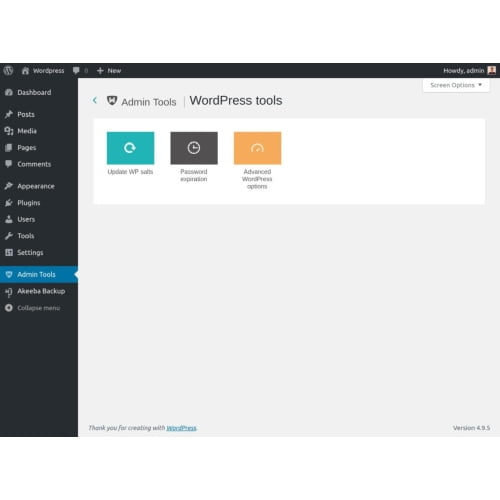
Admin Tools for WordPress GPL – WordPress Admin Tools Plugin
Admin Tools for WordPress is a WordPress admin tools plugin for managing dashboard settings. It is intended for site owners and administrators who want a straightforward approach to WordPress site administration and backend management. Use it to manage dashboard settings while carrying out everyday tasks in the WordPress backend.
- 100% genuine GPL-licensed original files
- Lifetime updates included with your purchase
- Instant download after checkout
- Scanned, clean and safe for use on unlimited websites

Subscribe Today
Get Monthly Plan with unlimited downloads @ 75% Off
Rs. 499 Only
$59.00 Original price was: $59.00.$2.39Current price is: $2.39.
Payment Methods:

Description
WordPress admin tools help make everyday site administration more straightforward by giving you a focused way to manage dashboard settings. Admin Tools for WordPress is intended for site owners and administrators who want a practical approach to working in the WordPress backend. It provides a dedicated plugin option for people who want dashboard management to be part of an organised site routine.
Use it as part of your WordPress site administration routine to keep dashboard management tasks organised. Its purpose is to support a more manageable admin experience while you take care of your site. You can include the plugin in the way you review and work with the dashboard, alongside the other tools and settings already used on your website.
WordPress administration can involve a range of regular activities, from reviewing settings to keeping the backend in order. A focused admin utility can give those activities a clearer place in your workflow. The plugin is intended for managing dashboard settings; review its available options after installation to decide how they fit your particular site and working habits.
Key Benefits of WordPress Admin Tools
- A focused approach to dashboard settings: Manage dashboard settings through a tool built for WordPress administration, helping you keep routine backend work in view. A dedicated plugin can make it easier to return to the relevant settings when you are carrying out regular site management.
- More manageable site administration: Bring a dedicated admin utility into your regular workflow, so common administration tasks have a clear place in your process. This can be useful when you want a consistent way to approach dashboard management rather than treating it as an occasional task.
- Useful for everyday backend work: Keep the WordPress admin dashboard at the centre of your site management, with a plugin intended for working with its settings. It is designed for administrators who spend time in the backend and want a practical addition to their existing routine.
- A straightforward addition to your setup: Add the plugin to your WordPress site and use its settings as part of the way you manage the dashboard. After activation, you can review the available options and decide which ones are relevant to your administration workflow.
Who Is It For?
Admin Tools for WordPress is suited to freelancers, agency owners, store builders, site owners and administrators who handle WordPress sites and want a direct way to manage dashboard settings. Whether you look after one website or include WordPress backend management in client work, this plugin is intended to support your day-to-day administration routine.
It may be a practical fit for people who want a dedicated plugin in their admin setup and prefer to review dashboard options from within WordPress. Freelancers and agencies can consider it as part of the process they use when working on a client site, while individual site owners can include it in their own regular backend checks. Your exact workflow will depend on the site and the settings you need to manage.
What You Get
- The Admin Tools for WordPress plugin files included with the product download.
- Access to the plugin’s settings after installation and activation in WordPress.
- A plugin for managing dashboard settings as part of your WordPress site administration workflow.
The download is for the plugin files, which you install on your WordPress site. Once the plugin is active, its settings can be reviewed through WordPress. Check the options available in your installation and use the ones that suit your admin process; the product information does not specify additional services or integrations.
Easy Installation
- Download the plugin files and open your WordPress dashboard.
- Go to the plugin installation area, upload the plugin, and select the option to install it.
- Activate Admin Tools for WordPress from the plugins area.
- Open the plugin settings and configure the available options to suit your admin workflow.
Once it is active, you can return to the plugin settings whenever you want to review its available dashboard management options. Take a moment to check the settings after installation so you understand what is available before making changes. If you manage more than one site, consider how each site’s existing setup and administration process may differ.
Compatibility
Admin Tools for WordPress is designed for use with WordPress. For a smooth setup, use the latest WordPress and review your site’s existing plugin settings before adding new tools. WooCommerce compatibility is not specified for this product, so check your intended setup before relying on a particular integration. As with any addition to a site, consider your existing WordPress plugin compatibility when planning your admin setup.
Before installing a plugin on a site that is already in use, it is sensible to consider the current configuration and any other tools that affect your administration workflow. If a particular feature or integration is important to your setup, verify it rather than assuming it is included. This helps you make an informed decision about whether the plugin fits your WordPress site.
Why SafeGPL?
SafeGPL offers fast delivery, so you can get started with your download promptly. You receive the latest version available, with clean, ready-to-use files for your WordPress setup. If you need help along the way, helpful support is available to guide you through the process. SafeGPL makes it simple to access tools for your WordPress site administration.
FAQ
What does Admin Tools for WordPress do?
It is a plugin intended to help you manage dashboard settings as part of your WordPress backend workflow. Review its available settings after activation to see how they fit your site administration routine.
How do I use admin tools in WordPress?
Install and activate the plugin from your WordPress dashboard, then open its settings to review and configure the available options. You can revisit those settings as needed while managing your site.
Who can use this plugin?
It is intended for WordPress site owners and administrators, including freelancers and agencies managing websites. It can be considered by anyone who wants a dedicated tool for dashboard settings.
What should I expect in the download?
The product download includes the plugin files. After installation and activation, you can access the plugin’s settings in WordPress. The specific options available can be reviewed in the installed plugin.
Where can I get admin tools for WordPress?
You can get Admin Tools for WordPress from SafeGPL. It is a practical option for adding WordPress admin tools to your site administration workflow. Check that the plugin suits your WordPress setup before relying on a particular integration.