


Advanced Shipment Tracking Pro GPL – Shipment Tracking Plugin
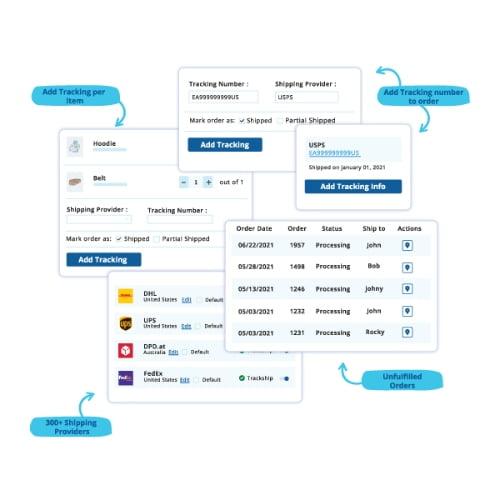
Advanced Shipment Tracking Pro is a shipment tracking plugin for WooCommerce stores that want to keep customers informed after checkout. Add shipment tracking numbers and tracking links to orders, then share delivery progress through a customer tracking page and tracking email notifications. It helps store owners manage order tracking while giving shoppers a clearer view of their shipments.
- 100% genuine GPL-licensed original files
- Lifetime updates included with your purchase
- Instant download after checkout
- Scanned, clean and safe for use on unlimited websites

Subscribe Today
Get Monthly Plan with unlimited downloads @ 75% Off
Rs. 499 Only
₹59 Original price was: ₹59.₹2Current price is: ₹2.
Payment Methods:

Description
A shipment tracking plugin can make the time between checkout and delivery clearer for both your store team and your customers. Advanced Shipment Tracking Pro helps WooCommerce store owners add tracking details to orders and share shipment progress through customer-facing tracking tools and email notifications. Instead of handling every delivery question separately, your team can keep important tracking information connected to the relevant order and give shoppers a place to check it themselves.
Clear post-purchase communication matters after an order has been placed. Customers want to know where to find shipment details, while store teams need a practical way to manage those details as orders move through their delivery process. This plugin brings tracking information into your WooCommerce workflow, helping make delivery updates easier to organise and access.
Key Benefits of This Shipment Tracking Plugin
- Add tracking details to orders: Record shipment tracking numbers and a tracking link with an order. Keeping these details alongside order information gives your team a convenient reference when managing deliveries or responding to customer questions.
- Keep customers informed: Share shipment progress through tracking email notifications, so shoppers can follow their order after checkout. This gives customers a way to receive delivery information without needing to ask your team for every update.
- Offer a customer tracking page: Give customers a dedicated place to check their shipment details. A central tracking page can make order information easier to find than searching through older messages or contacting the store for help.
- Support a smoother post-purchase experience: Bring tracking details and order status updates together in your WooCommerce workflow. Having shipment information associated with orders can make delivery communication easier for your team to manage.
- Make order information easier to organise: Keep shipment references connected to the orders they belong to, rather than treating delivery details as separate information. This can help your team work through order-related enquiries with the relevant details at hand.
Who Is It For?
Advanced Shipment Tracking Pro is built for WooCommerce store owners, freelancers, agencies and site builders who want a clearer way to manage shipment updates. It can suit businesses that handle customer orders and want shoppers to access tracking information without relying on repeated individual updates from the store team.
It may be useful for stores that want a more consistent way to add shipment details to orders and communicate them after checkout. Freelancers and agencies can also use it when setting up or maintaining WooCommerce stores where customer access to delivery information is part of the post-purchase workflow. The right setup depends on how your store manages orders and communicates with customers.
What You Get
- The Advanced Shipment Tracking Pro plugin files for use with a WooCommerce store.
- Tools to add shipment tracking numbers and tracking links to orders.
- Customer-facing shipment tracking information through a tracking page.
- Tracking email notifications to help share delivery updates with customers.
These tools are intended to support your store’s shipment communication process. Add the relevant tracking details to an order, then use the customer-facing options available in your setup to make that information accessible. The plugin helps bring order tracking into your WooCommerce store; the exact workflow you use can depend on your store configuration.
Easy Installation
- Sign in to your WordPress dashboard and open the plugin installation area.
- Upload the Advanced Shipment Tracking Pro plugin files and install the plugin.
- Activate it, then configure the tracking details and customer updates to suit your store.
After activation, review the available settings and decide how you want to add tracking details to orders and share updates with customers. You can tailor the workflow to the way your store handles delivery information. If you manage a store for a client, confirm the preferred customer communication process before configuring the tracking options.
Compatibility
Advanced Shipment Tracking Pro is intended for WordPress stores using WooCommerce. Keep WordPress and WooCommerce updated to their latest versions for a current store setup. Available options can depend on your store configuration, so review the plugin settings after installation to understand how they fit your existing order and communication workflows.
Why SafeGPL
SafeGPL provides fast delivery so you can get started with your download promptly. You receive the latest version available, with clean, ready-to-use files. If you need help along the way, our support team is here to assist with your purchase and setup questions. This can be useful if you need guidance while getting the plugin files installed or reviewing the initial setup for your store.
FAQ
What does Advanced Shipment Tracking Pro do?
It helps you add tracking numbers and links to WooCommerce orders and share shipment progress with customers through tracking tools and email notifications. The aim is to make delivery details easier for your team to manage and for customers to access after checkout.
How do I add shipment tracking to WooCommerce?
Install and activate the plugin in your WordPress dashboard, then add tracking details to the relevant orders and configure the customer updates you want to use. Check the available settings to see how the tracking page and email notifications fit your store’s workflow.
Can customers check their order tracking information?
Yes. The plugin supports a customer tracking page where shoppers can view shipment details and follow their order. This gives them a place to look for tracking information without needing to contact your team for each update.
Does the plugin include shipping carrier integration?
Carrier-related options can vary by setup. Review the plugin’s available settings after installation to see which tracking workflows suit your store. Do not assume a particular carrier option is available without checking your configuration.
Where can I check the Advanced Shipment Tracking Pro plugin price?
Check the product listing for current purchase details. Once you have the plugin, this shipment tracking plugin can help your store share delivery information in a more organised way, keep tracking details associated with orders and give customers a dedicated place to check shipment progress.